

Legal professionals routinely handle confidential information—client identities, financial records, privileged communications, and sensitive evidence. Improper disclosure of such data can lead to ethical violations, privacy breaches, and legal liability. That’s why redacting legal documents is a critical part of modern legal practice.
This guide explains everything legal professionals need to know about redacting legal documents, including what legal redaction is, when it’s required, best practices, and step-by-step instructions using AI-powered tools like Wondershare PDFelement.
What Is Redacting Legal Documents?
Redacting legal documents refers to the process of permanently removing or obscuring sensitive information before sharing or publishing a document. The goal is to ensure that confidential data cannot be viewed, copied, or recovered by unauthorized parties.
Redaction is commonly used when legal documents must be disclosed to opposing counsel, courts, regulatory bodies, or the public while protecting private information.
Unlike simple text highlighting or deletion, proper legal redaction permanently removes the data from the document layer, ensuring it cannot be recovered through copying, metadata inspection, or editing tools.
Proper redaction tools ensure that sensitive information is permanently erased from the document structure.
Why Legal Document Redaction Is Important
Redaction protects both clients and law firms from serious legal and ethical risks.
Protecting Confidential Client Information
Lawyers have a professional duty to maintain client confidentiality. Redaction helps protect:
- Personally identifiable information (PII)
- Financial data
- Medical records
- Privileged communications
Failure to redact sensitive information may violate attorney-client privilege or data protection regulations.
Compliance With Legal and Privacy Regulations
Many jurisdictions require redaction to comply with privacy laws and court filing requirements, including:
- GDPR
- HIPAA
- Court electronic filing rules
- Data protection regulations
Courts often require lawyers to remove Social Security numbers, birth dates, and financial account details from filings.
Preventing Data Breaches
Legal documents are frequently shared digitally. Proper redaction prevents:
- accidental disclosure
- unauthorized access
- reputational damage to law firms
How to Redact Legal Documents Using Wondershare PDFelement
Introduction to Wondershare PDFelement
Wondershare PDFelement is a powerful PDF solution widely used by legal professionals to manage, edit, and secure legal documents. It provides advanced PDF tools to edit and convert PDF, AI-powered capabilities such as AI PDF summarizer, and specialized security features designed for handling sensitive information.
One of its most valuable capabilities for law firms is the Smart Redact feature, which automatically detects and removes sensitive data such as names, phone numbers, and identification numbers across an entire document. This significantly reduces manual review time and helps ensure compliance with privacy regulations.
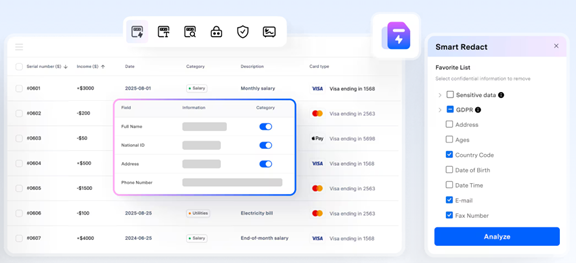
PDFelement also includes several features useful for legal workflows:
- AI Smart Redaction to automatically detect sensitive data
- Manual redaction tools for precise control
- Search-and-redact functionality to remove repeated terms
- Batch processing for large document sets
- Permanent removal of redacted content
- Secure document management and annotations
These capabilities make PDFelement particularly valuable for litigation, discovery review, contract preparation, and court filings, where accuracy and confidentiality are essential.
Step-by-Step Guide: Redacting Legal Documents With PDFelement
Redacting legal documents using PDFelement is straightforward and designed to minimize errors.
Step 1: Open the Document
Launch PDFelement and open the legal document you want to redact.
Step 2: Access the Redaction Tool
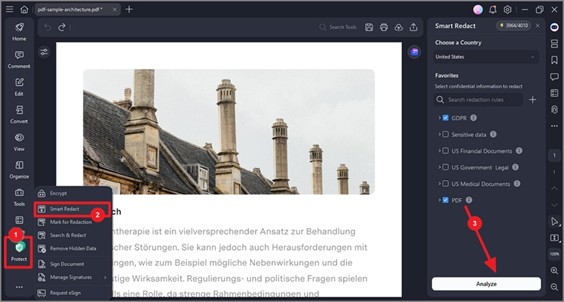
Navigate to the Protect tab and select the Redaction option.
Step 3: Use Smart Redaction
Use the Smart Redact feature to automatically identify sensitive data such as personal identifiers, phone numbers, and confidential information.
Step 4: Mark Items for Redaction
Review the detected information and mark the text or sections you want to redact.
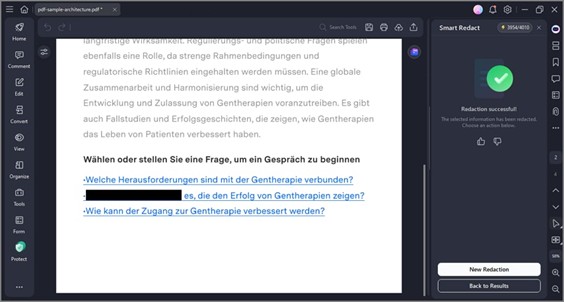
Step 5: Apply Redactions Permanently
Click Apply Redactions to permanently remove the selected information from the document.
Step 6: Save the Redacted Document
Save the redacted version of the file before sharing it externally.
This workflow ensures that sensitive legal information is permanently removed rather than simply hidden.
What Information Should Be Redacted in Legal Documents
Before redacting a document, legal professionals must identify which information requires protection.
Personally Identifiable Information (PII)
Common PII that should be redacted includes:
- Social Security numbers
- Passport numbers
- Driver’s license numbers
- Home addresses
- Phone numbers
Financial and Sensitive Data
Sensitive financial information should also be removed:
- bank account numbers
- credit card numbers
- tax records
- salary information
Confidential Legal Information
Certain legal information must be protected during discovery or filing:
- confidential settlement terms
- trade secrets
- privileged attorney-client communications
- protected witness information
Best Practices for Redacting Legal Documents
Even with advanced tools, effective redaction requires careful review.
Always Work From a Copy
Never redact the original document. Always create a working copy to preserve the original file.
Use Professional Redaction Tools
Avoid using basic editing tools like black boxes or highlighting. Professional redaction software ensures permanent removal of sensitive data.
Double-Check the Document
After redaction:
- review every page
- inspect document metadata
- verify that redacted text cannot be copied or revealed
Redact Metadata
Sensitive information may exist in metadata fields, comments, or hidden layers. Always remove metadata before sharing documents.
Train Legal Staff on Redaction Procedures
Many redaction errors occur due to lack of training. Ensure legal staff understand:
- what information must be redacted
- how to use redaction tools correctly
- document review procedures
FAQ: Redacting Legal Documents
What does redacting a legal document mean?
Redacting a legal document means permanently removing confidential or sensitive information before sharing the document with others.
Can redacted text be recovered?
If proper redaction tools are used, the removed information cannot be recovered. However, simple visual masking may still leave the data accessible.
What is the best software for redacting legal documents?
Professional PDF software such as Wondershare PDFelement provides secure redaction tools, including AI-powered Smart Redact that automatically identifies sensitive information.
Is redaction required for e-filing?
Most courts require sensitive personal information to be redacted before electronic filing to comply with privacy rules.
Final Thoughts
For legal professionals, redacting legal documents is essential for protecting confidentiality, complying with privacy laws, and preventing data breaches. Proper redaction requires both the right procedures and reliable tools. AI-powered solutions like Wondershare PDFelement simplify this process with advanced capabilities such as Smart Redact, search-based redaction, and secure document processing.